DavidR, thank you for being patient and understanding what my frame of mind is. Although I appreciate that this old bag of a computer was not in great shape - it worked. Had I left well enough alone after doing the MBAM I’d be okay - but of course I wanted to get an Anti-Virus on it.
That, in turn, has revealed the current sorry state of affairs.
Rather than spending a ton of money on this old ratbag of a computer - I’ll just go buy a new one. Doesn’t help me right now though. Plus - there is so much on this computer that is vital (which I can’t use) that this makes it not such an easy endeavor.
So - can I retrieve that file from SAS or not? Has it been deleted from the computer or is it in some vault somewhere?
Java is: Java™ 6 Update 20
XP does have SP 2 on it.
I’m thinking that there is no mention of the nasty file because SAS ripped it.
I don’t know.
So - have you guys got any idea what this is that has done this to me - or has it just been dismissed as “serves you right” for a bad system?
Secunia wouldn’t work. According to their literature, I’d assume it is due to the “illegitimate” condition of the OS.
I can understand if this group is not interested in working on this any further - given the “state” of affairs. But I am hoping that some amongst you will be curious in getting to the bottom of it.
SAS has a Quarantine section, in the Main window (double click the SAS tray icon), Manage Quarantine. That will allow you to restore the file, but believe me that is restoring an infected file. All you would be doing is treating the symptom (the errors as a result of the removal of the file) and not the disease, the infection itself. The associated registry entry which is calling for the loading of this file and because of the file being in quarantine, the error displayed.
So it will require more powerful tools to get to the bottom of this, which essexboy has in his tool-kit.
Although I kept getting pop-ups that SAS couldn’t open - it did. With some of the other programs, after finally opening they just failed and closed automatically. SAS did not do that.
Upon looking into the Quarantine area (sorry for the stupidity), it lists the items as:
First he has to get back to the forum, he like myself doesn’t work for Avast so he works also, so helps in his free time. He is in the same time zone as me so he will possibly only have got back from work.
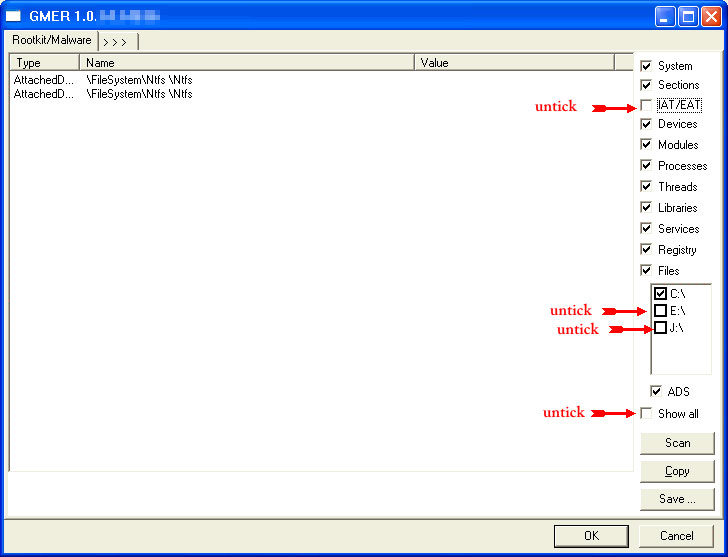
[*] If it gives you a warning about rootkit activity and asks if you want to run a full scan…click on NO, then use the following settings for a more complete scan…
[*] In the right panel, you will see several boxes that have been checked. Ensure the following are UNCHECKED …
[] IAT/EAT
[] Drives/Partition other than Systemdrive (typically C:)
[*] Show All (don’t miss this one)
http://www.geekstogo.com/misc/guide_icons/GMER_thumb.jpg
Click the image to enlarge it
[*] Then click the Scan button & wait for it to finish.
[*] Once done click on the [Save…] button, and in the File name area, type in “ark.txt”
[*]Save the log where you can easily find it, such as your desktop. CautionRootkit scans often produce false positives. Do NOT take any action on any “<— ROOKIT” entries
Please copy and paste the report into your Post.
[*]Double click on the icon to run it. Make sure all other windows are closed and to let it run uninterrupted.
[*]Select Scan all users
[*]Under the Custom Scan box paste this in
[*]Click the Quick Scan button. Do not change any settings unless otherwise told to do so. The scan wont take long.
[*]When the scan completes, it will open two notepad windows. OTL.Txt and Extras.Txt. These are saved in the same location as OTL.
[*]Due to forum restrictions please attach the logs to your post