The next thing to try would be a clean boot and then check out which services if any are causing the slowdown/memory leak
Would you be game to try that ?
The next thing to try would be a clean boot and then check out which services if any are causing the slowdown/memory leak
Would you be game to try that ?
I’ll see if I can get any results from that, but because of how long it can take for the slowdown to begin, it may take a long while.
So far I’ve tried all non-Microsoft services and even with all of them disabled, the slowdown still occurs. Firewall still disabled itself as well. I might try out the Microsoft services later but as I said before, this takes a long while to test out.
If when all non MS services are disabled and there is no change then it would be pointless to continue
As it stands I can see no malware … So lets use a different tool in my armoury to finally confirm that
Scanning with GMER
Before scanning, make sure all other running programs are closed and no other actions like a scheduled antivirus scan will occur while the scan is being performed. Do not use your computer for anything else during the scan.
http://img.photobucket.com/albums/v666/sUBs/gmer_zip.gif
Download GMER Rootkit Scanner from here or here.
[*] Extract the contents of the zipped file to desktop.
[*] Double click GMER.exe. If asked to allow gmer.sys driver to load, please consent .
[*] If it gives you a warning about rootkit activity and asks if you want to run scan…click on NO.
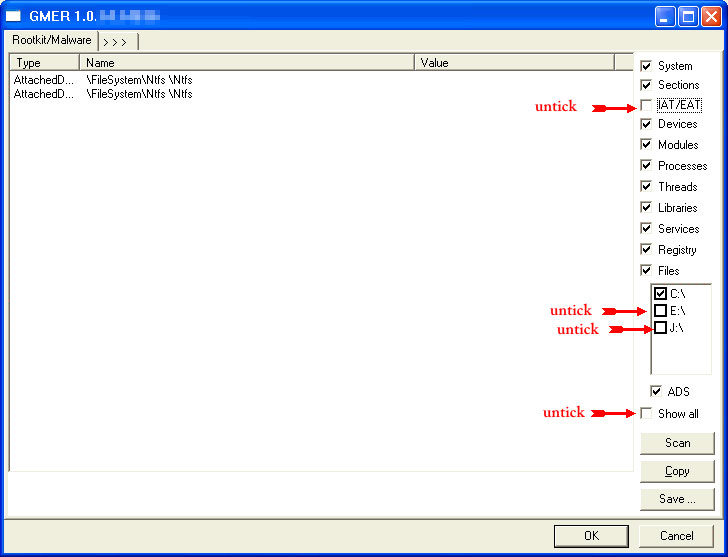
http://www.geekstogo.com/misc/guide_icons/GMER_thumb.jpg
Click the image to enlarge it
[] In the right panel, you will see several boxes that have been checked. Uncheck the following …
[] IAT/EAT
[] Drives/Partition other than Systemdrive (typically C:)
[] Show All (don’t miss this one)
[*] Then click the Scan button & wait for it to finish.
[*] Once done click on the [Save…] button, and in the File name area, type in “Gmer.txt” or it will save as a .log file which cannot be uploaded to your post.
[*]Save it where you can easily find it, such as your desktop, and attach it in your reply.
Notes:
[I]Caution
Rootkit scans often produce false positives. Do NOT take any action on any “<— ROOKIT” entries
[i]-- If you encounter any problems, try running GMER in safe mode.
– If GMER crashes or keeps resulting in a BSODs, uncheck Devices on the right side before scanning
I tried running GMER but I got the following errors, even in safe mode:
-Upon start, I get “C:\Windows\system32\config\system: The system cannot find the file specified.”
-Upon trying a Scan, I get “C:\Windows\system32\config\system: The process cannot access the file because it is being used by another process.”
-Press OK, then get “C:\Users\Igoor\ntuser.dat: The process cannot access the file because it is being used by another process.”
-Press OK, says “GMER hasn’t found any system modification.”
If I try to save a log after this, it is entirely blank, so I’m assuming it wasn’t able to perform any actual scanning.
-Press OK, says "GMER hasn't found any system modification."This is the main part of interest
Could you run sfc /scannow from an elevated command prompt and let me know if it finds any errors
It says “Windows Resource Protection did not find any integrity violations.”
You have Lucid logix GPU virtulisation… Could you uninstall/disable that please
Uninstalled it, no change in GMER or sfc /scannow.
And is it still lagging badly in normal mode ?
Again what programme is hogging the CPU
The following programme will create a Zip file for me to analyse , the forum does not allow that type of attachment. So could you upload to a file sharing site for me to collect
Download AVPTool from Here to your desktop
Run the programme you have just downloaded to your desktop (it will be randomly named )
First we will run a virus scan
Click the cog in the upper right
http://dl.dropbox.com/u/73555776/Kas%20front.JPG
Select down to and including your main drive, once done select the Automatic scan tab and press Start Scan
http://dl.dropbox.com/u/73555776/Kas%20Scan%20area.JPG
Allow AVP to delete all infections found
Once it has finished select report tab (last tab)
Select Detected threats report from the left and press Save button
Save it to your desktop and attach to your next post
Now the Analysis
Rerun AVP and select the Manual Disinfection tab and press Start Gathering System Information
http://dl.dropbox.com/u/73555776/kas%20manual.JPG
On completion click the link to locate the zip file to upload and attach to your next post
It still managed to lag. Google Chrome is using the most CPU this time, but again, this isn’t unusual, as I’ve simply switched primary browsers from Firefox to Chrome.
I tried the virus scan twice but it crashed both times at 98%, having detected nothing up to that point. But the Manual Disinfection procedure worked, and the file can be found here.
Run this and let me know if you still get the locks
[*]Re-run AVPTool
[*]Select the Manual Disinfection tab and press Script execution
http://i1224.photobucket.com/albums/ee362/Essexboy3/AVP%20shots/avpmanual.gif
[*]Where it states Insert text script in the following box copy the below script and press Run script
Copy from Begin until End
http://i1224.photobucket.com/albums/ee362/Essexboy3/AVP%20shots/avpscript.gif
begin
SetAVZPMStatus(True);
SetAVZGuardStatus(True);
SearchRootkit(true, true);
 DeleteService('76516084');
 StopService('76516084');
 DeleteService('61007546');
 StopService('61007546');
 DeleteService('45390573');
 StopService('45390573');
 BC_DeleteSvc('45390573');
 DeleteFile('45390573.sys');
 BC_DeleteFile('45390573.sys');
 BC_DeleteSvc('61007546');
 DeleteFile('61007546.sys');
 BC_DeleteFile('61007546.sys');
 BC_DeleteSvc('76516084');
 DeleteFile('76516084.sys');
 BC_DeleteFile('76516084.sys');
BC_ImportDeletedList;
BC_ImportAll;
ExecuteSysClean;
BC_Activate;
RebootWindows(true);
end.
[]Your system will reboot on completion, if it does not please do so yourself
[]On completion please run another analysis scan and attach the zip file
Ran that, can’t confirm that the system is still running slow yet however, but I have the new analysis here.
I will wait now with bated breath
Yep, it’s still there, just had Windows Explorer freeze up on me briefly, after difficulty loading thumbnails.
At this stage I feel the quickest solution would be to re-install windows… As at the moment I can see no rhyme nor reason for it
So I tried to reinstall Windows... which didn't end well.
But I got tired of Ubuntu's gaming support, and switched back to Windows 7 very recently, in hopes that the issue wouldn't return.
He has already reinstalled windows
Indeed I have gone through it a couple times now. I don’t see it helping frankly.
When you remove Linux and reinstalled windows did you wipe before the installation ?
As from all that I have seen this does not appear to be malware
Yes, I wiped the hard drive before installation.