Do you have any other extensions or add-ons to Chrome?
Does it improve if you clear cache on Chrome?
Do you have any other extensions or add-ons to Chrome?
Does it improve if you clear cache on Chrome?
I dont have any other extensions installed. I clear all Chrome data/cache/cookies etc. regularly.
Let’s answer what prokopes_ asked.
When I disable all shields, the problem persists. Only uninstalling Avast solves the issue.
Thank you for your answers. Would you be able to capture the laggy experience on a video? There are various types of “slow behavior” which are difficult to understand from written text.
Here is the video:
hXXps://ln5.sync.com/dl/bffc313c0#mn9f6mqx-kwgbcaz3-xzwee69s-qyayz933
hXXps://ln5.sync.com/dl/c3540e440#2ttwi55v-u6u4uk79-sxchm8u8-tvhh6u8a (This video is rotated 180 degrees.)
(For unknown reason this forum not allow me upload links, so replace XX)
This slowdown happens on every site I visit.
This slowdown is not caused by a slow internet connection, a slow computer, a server issue, or malware.
Ublock Origin Lite uses default settings. No other extensions are installed.
I use only one Antivirus (Avast).
Disabling all Avast shields does not solve this issue, but the slowdown completely vanishes when Avast is uninstalled.
I experience this slowdown on multiple computers with Windows 10 and Windows 11, all with Avast installed.
Occasionally, the slowdown temporarily disappears when Chrome is updated to a new version, but returns after a few computer restarts.
General computer speed is not affected; only Chrome is slow. Uninstalling Chrome with the “User Data” folder removed and then reinstalling it did not solve the issue.
Thank you @TheOwner for the videos and the additional info!
Can you please record this experience using the “Windows Performance Analyzer” tool? Once that’s done, please attach the log via the Support Tool:
A) Capture the performance log:
cd c:/wpr -start "C:\ProgramData\Avast Software\Avast\profile.wprp"wpr -stop avast-log.etl"C:/avast-log.etl"B) Attach the log to our Support Tool log:
Apologies for the late reply. The last couple weeks have been busy.
I’m not experiencing the issue myself, as I haven’t updated past version 25.2 after reading many others have this issue since 25.3 released. Hence why I keep asking every once in a while if the people who experienced the issue are still experiencing it.
I don’t even use chrome, but I still holding fast on 25.5. For me what has been reported, on other bugs/issues in the forums from the release of 25.6 onwards.
I need this, my only system to remain stable and still on Windows 10 (on extended support), I can do without the aggravation.
File ID:JVID1
Hello,
I just installed Windows 11 in a brand new PC, and I’m experiencing similar issues, using either Chrome and Edge.
I use Avast free, with https check deactivated in web shield, and firewall uninstalled. Instead, I use Comodo as personal firewall. Windows defender is deactivated as well.
In windows 11, the browsing is extremely sluggish: often download of a page freezes, and restart soon as i deactivate Avast protections. Other times I have to deactivate Avast, close the browser and restart it in order to download the page.
Sometimes deactivating only web shield is enough, other times I need to deactivate all protections. The behaviour is similar to what was happening in the past with https scanning active, but now is deactivated.
I have another PC with the exact same configuration, but windows 10, and is working fine.
If this is not going to be solved in the following days I’ll have to uninstall Avast from this PC and install another product.
BTW, in order to enter this forum I had to deactivate Avast protections. 
File ID IYJII
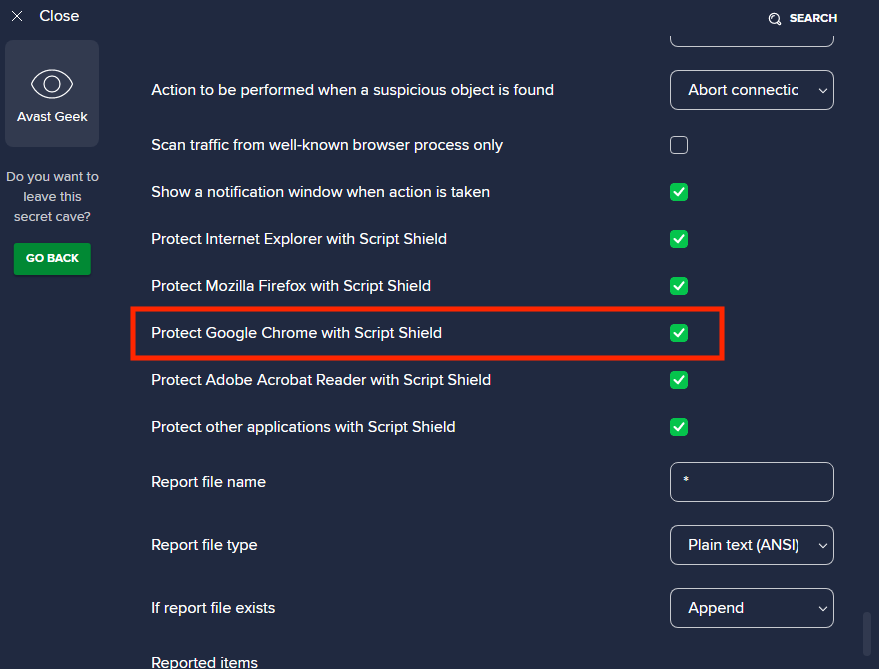
Hello @TheOwner and @blade9722 , thank you very much for sending the logs! We currently suspect this problem could be related to the “Script Shield” feature.
Can you please check if the problem persists when you disable the option “Web Shield: Protect Google Chrome with Script Shield“ in Avast Geek:Area?
Once Script Shield is disabled, restart Chrome and check if the problem still persists - all the chrome processes must be restarted, not just the browser window. If you’re not sure how to restart all Chrome processes, you can also restart your computer.
OK, I’ll try this. Actually I’m having the issue also with Microsoft Edge. Is this browser being targeted by the Chrome setting, being the two derived from Chromium project, or I’ll have to unflag also “Protect other applications with Script Shield”?
Hello,
thank you for your suggestion. I’ve followed the instructions and disabled the “Web Shield: Protect Google Chrome with Script Shield“ option in the Avast Geek:Area, then restarted Chrome (and also my computer). Unfortunately, the issue still persists.
As I mentioned before, disabling all shields did not solve this issue either.
Please let me know if you need me to provide anything else or perform any additional steps.
I wanted to be 100% sure, so I uninstalled Avast again today, and once more it was confirmed that the problem was immediately resolved after Avast uninstallation.
Without uninstalling avast, have you tried disabling self-defense (“until I reactivate it” mode) and/or hardware virtualization assistance in addition to all shields?
And restart your computer.
Hello, I tried the suggested fix, actually I disabled all the script shields, but also for me the issue still persist.
Now, I think that is somewhat related to windows 11, because, I have other two PCs with windows 10, one in the same LAN, where the web protection is working fine.
Until it is fixed, I have to keep the web protection disabled.
Disabling web protection solves the issue in my case.
What is hardware virtualization assistance?
I tried disabling hardware virtualization assistance, and is not solving the issue. Again, the only way seems disabling web defence, but it is a pity, as this feature is useful while navigating, and in Avast is available in the free edition while in Avira you have to pay for it.