This topic is not for icarus.exe issue, you better post and ask on appropriate one.
Both issues are open, if this beta fixes either or both, might as well get that feedback.
This just happened to me; I had automatic updates in the Software Updater turned OFF, but the latest update to Avast turned it back on and updated all my apps. This is BAD!
I hate this when it updates and changes ‘Your’ settings.
It just switched the Smart Scan back on.
Yes. I just found Smart Scan was scheduled again, despite being turned off by me. I do not like that sort of trick as it creates uncertainty and loss of trust. Must have been virus defs update that did that. I had to turn Smart Scan setting back to “Manual” again.
I checked Program version update is still set to Manual and waiting as I have not done it yet. I await announcement of the new version here on the forum and any feedback, before I do a Manual program update.
Strange, mu Program Updates are set to Manual and until I manually updated to 25.5.10141.0 I hadn’t got a Smart Scan kick off.
This happened before, but with the Network Shield/Firewall settings and kept up throwing up Network Shield notifications.
Any such changes to the ‘User Settings’ should be mentioned in the Program update notifications, but then again we haven’t seen an official 25.5 notification in the forums.
Smart Scan is set to ‘recommended’ under frequency in settings. And recommended is whatever Avast thinks is right, instead of what you had set.
What I said in my an earlier reply.
As far as I’m concerned, the release notes were displayed after the update and after rebooting (UI).
But nothing of the sort was mentioned, the only note was “fixed few minor bugs”.
Following an update (def?) this lunchtime, I’ve just seen notifications for the purchase of other avast programs (antitrack, vpn,…) whereas my privacy settings are set not to have them (I use premium).
On the other hand, my notification settings, which were set to “strict”, have been changed to “smart” without my consent.
It’s not very good from avast not to follow our recommendations. 
Oups, sorry … rather ”limited" 
if yesterday avast wanted me to buy antitrack and VPN secureLine, today 2 new notifications to buy Breach Guard and Driver Updater and this in spite of the fact that the notifications of the offers are always unchecked and that I am in limited mode…


I haven’t had the chance to use cleanup yet, but I’m sure avast will have it for me tomorrow. 
I do not appreciate at all that avast does not respect what is said in their conditions. 
I don’t have that option for Silent Mode + Threat Alerts. Is that a premium feature?
option “limited mode”?
Not only for premium but also for free.
Look at DavidR Screen:
however, that’s not the point.
because premium users have the option of refusing avast to send you notifications for one of their other paid products or for third-party products…this function doesn’t seem to have worked since yesterday.
This problem obviously didn’t occur directly after the program update, but a week later.
No. My Avast Free has only three options: Smart, Limited, and Silent. You have a fourth: Silent mode with Alerts.
The Free Option has the Option ‘Share app-usage data with Avast so we may offer you 3rd party products’ which I have unchecked.
No idea what Avast may call 3rd party apps, I initially thought this would be other paid Avast paid products.
One of the reasons I don’t run the so called Smart Scan is the last element of that suggests you need X Avast paid products.
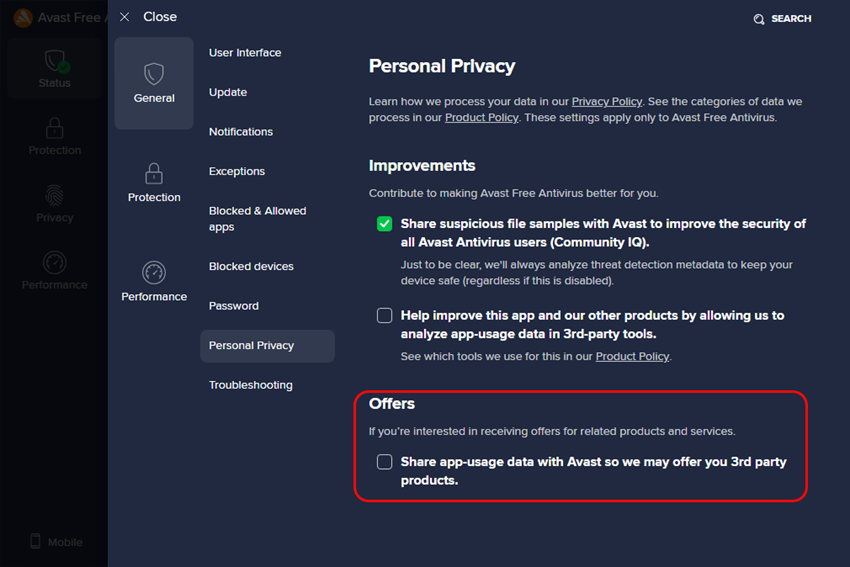
In any case, for the paid version configured not to receive this kind of notification, we shouldn’t receive any … So it’s either a bug, or avast wants to force its premium users to see the brand’s other paid products.
These notifications do not appear following a smart scan, they appear without any specific action.
However, I no longer had any new notifications on the device (W7) that had received them last week, but I did have some on a new device (W10) yesterday.
My notifications are almost always filled with one or two of these alerts, even in limited mode. Always just upsell stuff. Ads basically. Now I understand I’m using Avast Free and ads are part of the deal. But notifications are for actual alerts. Not ads. It is misleading. I’ve commented on that previously on the forum but no change sadly.