nah, that isnt even close to being funny
mga ulol!!!
the team to mess up something?
if you don’t understand whats going on please try to investigate and learn about it
or a simple rule.
please stop posting useless (or even offensive) posts that don’t add any value. Only post where you have something meaningful to add, or don’t post at all.
is that clear?  ;D 8)
;D 8)
sorry for off topic
Regards!!!
One fix coming up
Run OTL
[*]Under the Custom Scans/Fixes box at the bottom, paste in the following
:OTL
O4 - HKU\S-1-5-21-220523388-1275210071-839522115-1005..\Run: [newupdate1142C.exe] C:\Documents and Settings\Karlson\Application Data\F928DFC1128A2CB13D52696EC738EF7D\newupdate1142C.exe ()
O4 - HKU\S-1-5-21-220523388-1275210071-839522115-1005..\Run: [YVIBBBHA8C] C:\Documents and Settings\Karlson\Local Settings\Temp\Qmg.exe ()
O16 - DPF: {CAFEEFAC-0016-0000-0001-ABCDEFFEDCBA} http://java.sun.com/update/1.6.0/jinstall-1_6_0_01-windows-i586.cab (Reg Error: Key error.)
O16 - DPF: {CAFEEFAC-0016-0000-0002-ABCDEFFEDCBA} http://java.sun.com/update/1.6.0/jinstall-1_6_0_02-windows-i586.cab (Reg Error: Key error.)
O16 - DPF: {CAFEEFAC-0016-0000-0003-ABCDEFFEDCBA} http://java.sun.com/update/1.6.0/jinstall-1_6_0_03-windows-i586.cab (Reg Error: Key error.)
O16 - DPF: {CAFEEFAC-0016-0000-0005-ABCDEFFEDCBA} http://java.sun.com/update/1.6.0/jinstall-1_6_0_05-windows-i586.cab (Reg Error: Key error.)
O16 - DPF: {CAFEEFAC-0016-0000-0007-ABCDEFFEDCBA} http://java.sun.com/update/1.6.0/jinstall-1_6_0_07-windows-i586.cab (Reg Error: Key error.)
O37 - HKU\S-1-5-21-220523388-1275210071-839522115-1005\...exe [@ = secfile] -- "C:\Documents and Settings\Karlson\Local Settings\Application Data\ave.exe" /START "%1" %* File not found
[2010/04/19 19:19:31 | 000,823,808 | ---- | M] () -- C:\WINDOWS\System32\drivers\cosqgfz.sys
[2010/04/19 16:10:05 | 000,010,768 | -HS- | M] () -- C:\Documents and Settings\All Users\Application Data\22k5paIc
[2010/04/19 16:02:58 | 000,010,776 | -HS- | M] () -- C:\Documents and Settings\Karlson\Local Settings\Application Data\22k5paIc
[2010/04/19 19:31:40 | 000,823,808 | ---- | M] () Unable to obtain MD5 -- C:\WINDOWS\system32\drivers\cosqgfz.sys

:Reg
[-HKLM\Software\Classes\secfile]

[HKEY_CLASSES_ROOT\.exe]
@="exefile"
"Content Type"="application/x-msdownload"

[HKEY_CLASSES_ROOT\.exe\PersistentHandler]
@="{098f2470-bae0-11cd-b579-08002b30bfeb}"

[HKEY_CLASSES_ROOT\exefile]
@="Application"
"EditFlags"=hex:38,07,00,00
"TileInfo"="prop:FileDescription;Company;FileVersion"
"InfoTip"="prop:FileDescription;Company;FileVersion;Create;Size"

[HKEY_CLASSES_ROOT\exefile\DefaultIcon]
@="%1"

[HKEY_CLASSES_ROOT\exefile\shell]

[HKEY_CLASSES_ROOT\exefile\shell\open]
"EditFlags"=hex:00,00,00,00

[HKEY_CLASSES_ROOT\exefile\shell\open\command]
@="\"%1\" %*"

[HKEY_CLASSES_ROOT\exefile\shell\runas]

[HKEY_CLASSES_ROOT\exefile\shell\runas\command]
@="\"%1\" %*"

[HKEY_CLASSES_ROOT\exefile\shellex]

[HKEY_CLASSES_ROOT\exefile\shellex\DropHandler]
@="{86C86720-42A0-1069-A2E8-08002B30309D}"

[HKEY_CLASSES_ROOT\exefile\shellex\PropertySheetHandlers]

[HKEY_CLASSES_ROOT\exefile\shellex\PropertySheetHandlers\PEAnalyser]
@="{09A63660-16F9-11d0-B1DF-004F56001CA7}"

[HKEY_CLASSES_ROOT\exefile\shellex\PropertySheetHandlers\PifProps]
@="{86F19A00-42A0-1069-A2E9-08002B30309D}"

[HKEY_CLASSES_ROOT\exefile\shellex\PropertySheetHandlers\ShimLayer Property Page]
@="{513D916F-2A8E-4F51-AEAB-0CBC76FB1AF8}"

[-HKEY_CURRENT_USER\Software\Classes\exefile]
[-HKEY_CURRENT_USER\Software\Classes\.exe]

[HKEY_CLASSES_ROOT\exefile\shell\open\command]
@="\"%1\" %*"

:Commands
[resethosts]
[purity]
[emptytemp]
[EMPTYFLASH]
[Reboot]
[*]Then click the Run Fix button at the top
[*]Let the program run unhindered, reboot the PC when it is done
[*]Open OTL again and click the Quick Scan button. Post the log it produces in your next reply.
Thanks for the quick replies everyone,
Attached is the OTL log after performing all the tasks outlined by Essexboy.
OK the bad boy did not want to go - two programmes to run now. One is a cleaner and the other an analyser, could you run them in this order please
Download ComboFix from one of these locations:
* IMPORTANT !!! Save ComboFix.exe to your Desktop
[*]Disable your AntiVirus and AntiSpyware applications, usually via a right click on the System Tray icon. They may otherwise interfere with our tools
[*]Double click on ComboFix.exe & follow the prompts.
[*]As part of it’s process, ComboFix will check to see if the Microsoft Windows Recovery Console is installed. With malware infections being as they are today, it’s strongly recommended to have this pre-installed on your machine before doing any malware removal. It will allow you to boot up into a special recovery/repair mode that will allow us to more easily help you should your computer have a problem after an attempted removal of malware.
[*]Follow the prompts to allow ComboFix to download and install the Microsoft Windows Recovery Console, and when prompted, agree to the End-User License Agreement to install the Microsoft Windows Recovery Console.
**Please note: If the Microsoft Windows Recovery Console is already installed, ComboFix will continue it’s malware removal procedures.
http://img.photobucket.com/albums/v706/ried7/RcAuto1.gif
Once the Microsoft Windows Recovery Console is installed using ComboFix, you should see the following message:
http://img.photobucket.com/albums/v706/ried7/whatnext.png
Click on Yes, to continue scanning for malware.
When finished, it shall produce a log for you. Please include the C:\ComboFix.txt in your next reply.
THEN
http://www.geekstogo.com/misc/guide_icons/gmer.png
GMER Rootkit Scanner - Download - Homepage
[] Download GMER
[] Extract the contents of the zipped file to desktop.
[*] Double click GMER.exe.
http://img.photobucket.com/albums/v666/sUBs/gmer_zip.gif
[*] If it gives you a warning about rootkit activity and asks if you want to run a full scan…click on NO, then use the following settings for a more complete scan…
[*] In the right panel, you will see several boxes that have been checked. Ensure the following are UNCHECKED …
[] IAT/EAT
[] Drives/Partition other than Systemdrive (typically C:)
[*] Show All (don’t miss this one)
http://www.geekstogo.com/misc/guide_icons/GMER_thumb.jpg
Click the image to enlarge it
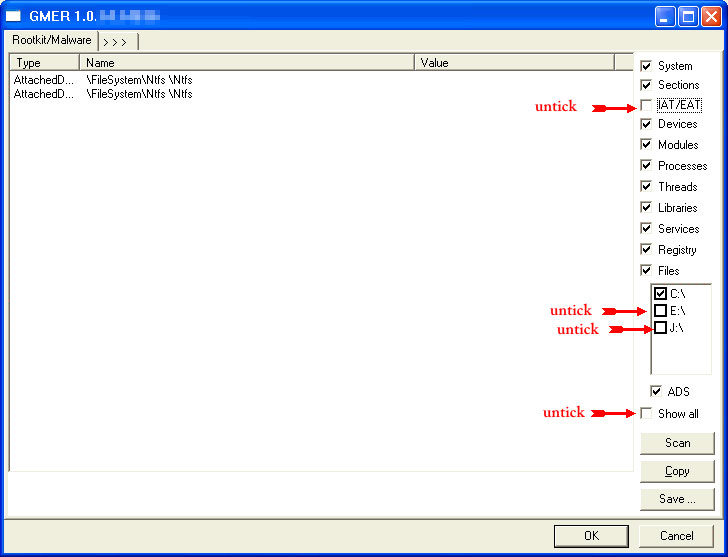
[*] Then click the Scan button & wait for it to finish.
[*] Once done click on the [Save…] button, and in the File name area, type in “ark.txt”
[*]Save the log where you can easily find it, such as your desktop.
CautionRootkit scans often produce false positives. Do NOT take any action on any “<— ROOKIT” entries
Please copy and paste the report into your Post.
Thanks for all the guidance Essexboy,
I have attached the logs generated by ComboFix (there are two because ComboFix ran two scans)
However, whenever I run a GMER scan, the computer reboots before I have a chance to save the log and the message that “The system has recovered from a serious error” pop ups. I’ve run the scan twice to no avail.
Could you try GMER from safe mode please
Combofix killed the latest variant of the TDSS rootkit
So GMER should confirm it has gone
Hmm for the last few days I’ve run GMER twice, once in safemode and it completed the scan in 13 hours, but the computer froze when I tried to save the log.
I ran a second scan today (this time booted normally) for 9 hours and again it froze.
Are there some programs that are freezing up GMER? It’s odd because I’ve already tried to close all other programs.
Thanks
It looks like you have one of the systems in about 200 that GMER fails to work on - there is no rhyme nor reason as to why
What problems are you having at the moment ?
So far I haven’t had any problems with my system after having combofix run, so it’s probably fine for now.
Thanks so much for the help, I’ll come back in the future if there are any problems!
OK I will clear the tools for you
The following will implement some cleanup procedures as well as reset System Restore points:
Click Start > Run and copy/paste the following bolded text into the Run box and click OK:
ComboFix /Uninstall
Run OTL and hit the cleanup button. It will remove all the programmes we have used plus itself.